PersistentDatabase
Stores JSON data into database.
.. It's not possible to spawn new instances.Usage Limits
- 65536 keys limit.
- 10 input / output operations per minute.
- Each key can be a maximum of 4 Kb.
Testing Locally
In order to test Persistent Database on a local server, a developer access token is required to access the service.
The token can be created in the following link: https://hub.helixgame.com/account/tokens
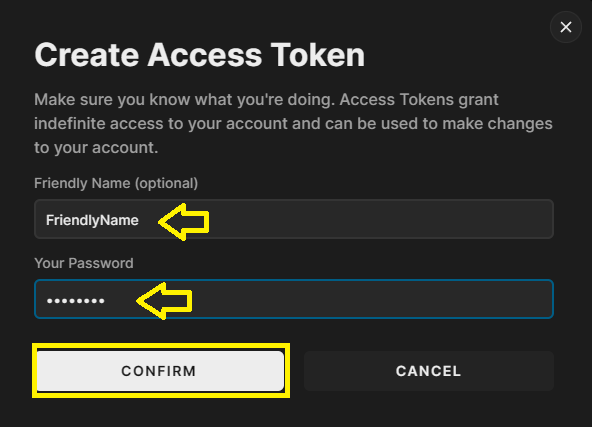
In the Access Token page, click on + GENERATE NEW to open the Create Access Token dialog box

Add a friendly name for the token and write your password (the same password used to login into HELIX) then click on "CONFIRM"
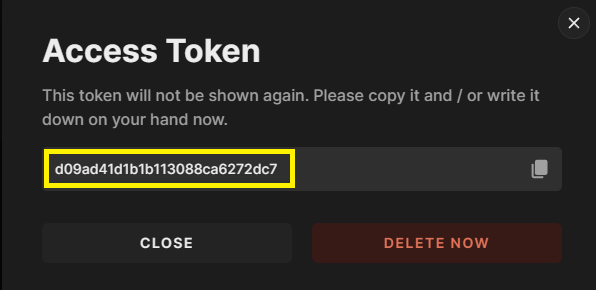
The access token will be generated and displayed onscreen, please copy it and save it safely
Now the local HELIXGameServer has to be excecuted using the token as a launch parameter. There are several ways to do this. Below there is an example to do it by using a BAT file:
1.- Create a new text document on the same folder where the HELIXGameServer.exe is.
2.- Rename the file toRunToken.bat
3.- Right click on that file and from the dropdown select "Edit"
4.- Paste the following code:
@echo off
cd /d "%~dp0"
HELIXGameServer.exe --token [access token]
5.- Replace [access token] with the token generated before and save the file before closing it.
6.- Run the bat file and the local server will be excecuted using your token.

📝 After completing these steps, the server is ready to run the code example below.
Examples
local json = JSON.stringify({ scriptingKey1 = "My data", scriptingKey2 = false, scriptingKey3 = 123, scriptingKey4 = { objKey1 = "My object data",  objKey2 = true}})
local key = "UniqueKey"

function InsertIntoDatabase(key, json)
    PersistentDatabase.Insert(key, json, function(success)
        if success then
            print("Key " .. key .. " inserted.") -- Key UniqueKey inserted.
            GetMyKey(key)
        end
    end)
end

function GetMyKey(key)
    PersistentDatabase.GetByKey(key, function(success, data)
        if success then
            print("Getting key...")
            print(data) -- [{"id":"f49cee2a-900f-4e1f-91e7-44e4a02b024a","key":"UniqueKey","user_id":"eeed3229-47e6-4130-9904-e5bab2deaa32","value":{"scriptingKey1":"My data","scriptingKey2":false,"scriptingKey3":123,"scriptingKey4":{"objKey1":"My object data","objKey2":true}}}]
            local json_ret = JSON.parse(data) -- Parse JSON data
            print(json_ret[1]["value"]["scriptingKey1"]) --  My data
        end
    end)
end

PersistentDatabase.Create(function(success)
    if success then
        print("New space created.")
        InsertIntoDatabase(key, json)
    end
end)
Static Functions
| Returns | Name | Description | |
|---|---|---|---|
 | Create | Create new space into database. | |
| Insert | Insert new JSON data into database. | |
| Update | Update JSON data for a specific key. | |
| Delete | Delete a key from database. | |
| GetByKey | Query a specific key from database. | |
| GetAll | Query all data from database. | |
| GetSummary | Returns a brief summary of database usage |
Create
Create new space into database.
PersistentDatabase.Create(callback?)
| Type | Parameter | Default | Description |
|---|---|---|---|
| function | callback? | nil | The result will be called in the format `function(success)` |
Insert
Insert new JSON data into database.
PersistentDatabase.Insert(key, data, callback?)
| Type | Parameter | Default | Description |
|---|---|---|---|
| string | key | The data key to query. | |
| string | data | Data to be inserted in JSON format. | |
| function | callback? | nil | The result will be called in the format `function(success)` |
Update
Update JSON data for a specific key.
PersistentDatabase.Update(key, data, callback?)
| Type | Parameter | Default | Description |
|---|---|---|---|
| string | key | The data key to query. | |
| string | data | Data to be updated in JSON format. | |
| function | callback? | nil | The result will be called in the format `function(success)` |
Delete
Delete a key from database.
PersistentDatabase.Delete(key, callback?)
| Type | Parameter | Default | Description |
|---|---|---|---|
| string | key | The data key to query. | |
| function | callback? | nil | The result will be called in the format `function(success)` |
GetByKey
Query a specific key from database.
PersistentDatabase.GetByKey(key, callback?)
| Type | Parameter | Default | Description |
|---|---|---|---|
| string | key | The data key to query. | |
| function | callback? | nil | The result will be called in the format `function(success, data)`, `data` can be parsed with JSON.parse() function. |
GetAll
Query all data from database.
PersistentDatabase.GetAll(callback?)
| Type | Parameter | Default | Description |
|---|---|---|---|
| function | callback? | nil | The result will be called in the format `function(success, data)`, `data` can be parsed with JSON.parse() function. |
GetSummary
Returns a brief summary of database usage
PersistentDatabase.GetSummary(callback?)
| Type | Parameter | Default | Description |
|---|---|---|---|
| function | callback? | nil | The result will be called in the format `function(success, data)`, `data` can be parsed with JSON.parse() function. |